Showing posts with label Math. Show all posts

Monday, May 23, 2011

enVision Math - Review

Pearson Education has been around for many years in the public schools. They publish Scott Foresman, Addison Wesley, and more. Now, with the increase in families who educate at home, they are also marketing their products to homeschoolers. We were asked to review their 1st grade enVision Math book.

Photobucket

The book itself can be purchased for $34.47 and includes access to "digital learning". There are other products you can purchase here.

The book is very large (11x17) and very bright. It is designed for you to pull out the days lesson and fold the page in half to make a regular size (8 1/2 x 11) pamphlet to work through. Pearson's website say that enVision Math is the "new" Math. Their goal is to offer a Math curriculum so that every student understands Math. Through the use of manipulatives and interactive technology they hope to make Math more fun for all students.
Photobucket
The book is broken down in to 20 topics with 5-10 lessons and a game for each topic. Also included is a test at the end of each topic. The book we reviewed was 1st grade, but they also offer K - 6th grade books. Zach just finished Kindergarten and though we are not "officially" starting 1st grade for a month or two he was ready to jump right in to this book. Math is his strong subject and he loves to show off what he knows. He loved the bright, colorful pages. It also picked up right where Kindergarten math left off so it was great for him to get a little jump-start on first grade. Unfortunately, we did not have access to the digital component nor did we have the teacher's manual for this book so parts of the lessons we were not able to do because there was no explanation as to what to do. In order to fully use this program you definitely need to have a teacher's book. Also, the lessons are very short. We liked the short lessons but, in my opinion, they did not give quite enough practice of the concept being learned. I did like that the concepts were broken down in to very small pieces that a young child can understand easily, just not enough practice. It appears there is more practice that would be offered in the digital portion of the program, but I cannot say that positively.

Overall, I like the layout of the book. Zach enjoyed it, but because of the lack of practice of the concept being taught he did not retain much of the new material we learned. I think Pearson has a great product here, and a great way to teach Math -- using a digital, interactive format, in addition to the textbook. However, since we did not have full access to the program it is very difficult to say if the program would be successful for our family. If you would like to see a video of how enVision Math works in a regular classroom go here and click on "Next Generation of Math programs". There are manipulatives to go with many of the lessons as well as interactive lessons for the overhead projector and on the computer.

Since Pearson is new to providing products for homeschoolers I am hoping they can work out some of the differences between homeschoolers and the traditional school setting and offer some products that will work better in a home education setting. Their site is also not very homeschooler friendly. To register (in order to view samples) you have to put in your zip code and school district. They do have an option to say "I am a homeschooler" but when I chose that I was very limited to what samples I could see.

If you would like to see what other Crew members thought of this product as well as other Pearson Education products go here.

Disclaimer: I received this product for free in exchange for my honest opinion of the program. No other compensating was given for this review, and the above is my honest opinion.

Wednesday, May 18, 2011

Mad Dog Math - Review

I vividly remember standing in Mrs. Moser's 3rd grade class and reciting my multiplication facts. For each set of facts we earned we could choose a "ticket" that had various prizes on it. The most coveted prize was, of course, a free homework pass. We practiced multiple times each day in class and were very competitive. Math was my strongest subject so it was easy for me. Well, Paul is not that great with remembering math facts. We have tried so many different methods over the last three years with Paul. First it was addition and subtraction and now that he FINALLY has those down (most of the time) we have moved on to multiplication and division. He gets the more complicated Math without a problem, but the math facts are just tough for him to memorize. It has come a little easier for Zach, but it is still something we have to work on. He, at age 5, is only working on his addition facts.

When the opportunity for us to review Mad Dog Math, a math facts program, came along, I couldn't help but be drawn to it. Anything to help get those facts in their heads, and help them to stay there. It seems like if we take a week or two off from drilling math facts then Paul forgets all of them. It takes constant review and I guess we will continue that for a while until they are cemented in to his brain.

Photobucket

Mad Dog Math is a simple program that is geared for Kindergarten - 5th grade students. It could definitely be used with older students for remediation/review of all the math facts. There are 4 levels. Level 1 and 2 are addition and subtraction, level 3 is multiplication and division. The 4th level is the "Challenge" level and includes all 4 of the basic math operations. You can used the timed or untimed option for the program, depending on what works best for your students. As your student reaches mastery of each set of facts they are given a "sticker" and they are automatically moved on to the next set of facts or the next level. When they earn all their "stickers" they are a "Mad Dog Top Dog".

Our thoughts
Everyone knows that mastery of math facts is essential for success in higher math. So, any new idea to get math facts mastered is truly welcomed by me. Both boys worked really hard and have really tried to master the facts they need to know. I was very pleased with the simplicity of the program, and how easy it was for me to install and set up. I also like that it is easy for the boys to get started on their own. If I tell them to go do "Mad Dog Math" even Zach can open it and select the correct level and get started without my help. I also really like the "no frills" approach to learning the math facts. I don't want a video game when I am looking for my kids to drill math facts. Below is the main page of the program--very clean and simple, I really like that.

Mad Dog Math

For Zach, he truly loves Math, and anything related to numbers (it's reading we have to work on more with him). He gets upset if I don't have his Math drill sheets in his workboxes daily. Since he struggles a little in several other areas I think he really likes to show me how well he can do with his addition. So, for him, this program has been great. Also, since he is only 5, the "stickers" and the "Mad Dog Top Dog" award is very motivating to him. He likes the simplicity of the layout so that he is not distracted by "bright and shiny objects" along the way. It has worked really well for him and I have been really impressed with how well he is doing on his addition facts.

Paul, on the other hand, isn't as thrilled about doing math drills everyday, not even if it is on the computer. It is difficult to find anything to motivate him to work on this skill. So, he didn't love this program. At almost 10 the "stickers" that you earn aren't super interesting to him. He wants more of a game to play. His personality and learning style is so different than Zach's and the "bright and shiny objects" are not so distracting to him, but they keep him motivated. He doesn't play a ton of video games so he is not looking for a video game style, just something a little more interactive. So, the simplicity of the program didn't draw him in. However, it did help him with his multiplication and division facts, which, in my mind, means it is a great program. After all, I am not the type of Mom who only has their kids do what they want to do. I make them do what I know is best for them.

You can purchase the program at their website. It is available as a one year subscription for $19.95, two years for $29.95, or the best option, if you have multiple children at various ages, a perpetual license for $39.95. If you would like you can watch an informational video about the program here

They also offer several other products for Math fact mastery. You can take a look at them here

Don't forget to see what other crew members have to say about the program here

Disclaimer: I received this product for free in exchange for my honest opinion of the program. No other compensating was given for this review, and the above is my honest opinion.


- Posted using BlogPress from my iPad


Monday, January 31, 2011

City Creek Press - Times Alive Review

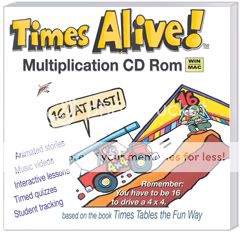
If your kids are bored with learning their times tables through the traditional means Times Alive is the solution. I was recently given the opportunity to review this downloadable program by City Creek Press. The downloadable version is priced at $44.95. The program is also available on CD Rom for PC or Mac for $48.95.

Photobucket

Times Alive has songs and stories to teach your child the times table. The songs are very catchy and easy to remember. You can see (and hear) some of the songs and stories that are on the program here.

Paul knows most of his multiplication tables so we did not use the program exactly the same as someone who knows none of their multiplication facts. If multiplication is new to a child I would suggest going straight through the "lesson list" and having them learn them in the order shown there. Each fact or group of facts has a story or song for the child to listen to and learn that fact (or group of facts). The child is then quizzed on that fact. The facts are periodically reviewed as the child moves through the program. You can also print out the "worksheets" and have your child review them in a more traditional way. For Paul he would have been very bored if he had to go through all the tables so I had him complete the tests that they give periodically and then go back and watch any of the videos that he did not know the facts quickly. He struggles with his 3's and 4's time tables (I know most kids struggle with the higher numbers but he has no trouble with those just the 3's and 4's) So, this program has helped him move those facts in to his long term memory! He has loved it and will never forget that 4 x 4 = 16, because you "have to be 16 to drive a 4x4". I will admit that I am a bit sick of hearing the stories and songs, but I am thankful he finally has the hang of some of these more difficult (for him) multiplication tables. The program is great for visual as well as auditory learners. I also loved the way the program tests the students periodically and reviews the math facts already learned.

If your budget doesn't allow for the price of this software City Creek Press offers lots of other products that make learning multiplication facts easy and fun. They also have packages that help reduce the cost of each individual product. Also, if your child is not ready for their multiplication tables they have just recently developed "Addition the Fun Way" for younger students. There is no age range suggested on the website. I feel the Times Alive would be appropriate for any child that can understand the concept of multiplication and that multiplication is simply fast adding--probably about 2nd grade. On the other end I don't think there would be an age that would be too old for this product. If a student doesn't know their times tables no matter how old they can benefit from this program. An older teen might find it a bit childish but it would still be very effective to commit the facts to memory.
Photobucket
You can see what other Crew members have to say here.

Disclaimer: I received this product for free in exchange for my honest opinion of the product. There was no other compensation given for the review


Friday, January 28, 2011

TenMarks Review


In our home Math is the second subject of the day (second only to Bible time) and it is the one that takes the longest. It is also the most dreaded subject of the day. Until now! Our latest review, TenMarks, has changed all that. TenMarks is an online Math program that customizes it's self to meet the needs of the student. According to their website:
TenMarks is the only online math program that helps students refresh, learn, and master math concepts - in their own time, at their own pace. Each child receives a personalized curriculum to help them master the concepts quickly.

Photobucket

TenMarks is available for grades 3 through high school. It is very reasonably priced with the premium version costing only
$10/month
$49/6 months
$89/12 months
You can try the regular version for free which offers a limited amount of the worksheets available to the premium member.
It is also available free to educators to use in the classroom--this does not include homeschoolers.

For us TenMarks has been a wonderful experience. Paul really dislikes Math. He is good at it but has no confidence in his Math ability. TenMarks has changed all that. He looks forward to doing TenMarks daily and even asks for it. He will happily do his 2-3 worksheets daily without complaint.

How it Works: You choose the grade level your child is in and then it shows you the "tracks" that a child at that grade level will typically work through in a year. You can move them around or delete them altogether if you would like. You can also add tracks from different grade levels. You then choose how many worksheets you would like your child to do in one week and they are "assigned" to them under their own account. If your child finishes the worksheets in less than one week there is a "fast track" option. This option has been great for us since I had Paul start at the beginning of third grade and he is actually almost finished with his regular 3rd grade curriculum. Much of what he has completed so far has been review. As the child moves through the curriculum there are videos to watch at the beginning of each lesson. They can view the video again in the middle of a "worksheet" or use the "hints" to help them answer the question. At the end of each worksheet a score is given along with a "concept strength" score. The child can go back and try to answer the incorrect answers and a new score is given. The concept strength is judged on how many videos or hints the child needs to answer the questions correctly. If the concept strength is low a new worksheet is assigned. I really like this feature. Paul is really good at getting correct answers using the "hints" but not totally understanding the concepts. There are also timed tests assigned at the end of each track.

The best part of TenMarks for ME was that there was one less subject I had to plan for. I don't necessarily want all subjects planned out for me and him doing them online but it was really nice to not have to figure out what we were doing in Math. In my lesson plans I just wrote down how many worksheets he was going to do each day. The other feature that is wonderful is that I can log in to the teacher account and view how he is progressing. I can also set up rewards for him along the way.

And one more "perk" is that because it is online I can even have him work a worksheet or two while on vacation...


Now from Paul's perspective:

Ten marks was really fun. It was a good thing to learn math. Because it will teach you in an easy way. My favorite thing about it is that you choose how fast you go like if you try your hardest it will go fast and easy. if you don't even think about it and just choose an answer, well good luck.

You can see what other TOS Crew Members have to say here.
Disclaimer: I received this product for free in exchange for my honest opinion of the product. There was no other compensation given for the review


Wednesday, January 5, 2011

Math Facts Now Review

Anyone who has taught Math knows that instant recall of basic Math facts is so important in later math skills. For kids who haven't learned the basics of addition, subtraction, multiplication and division facts it is hard to move on and learn more advanced math. The problem comes in when a homeschooling Mom simply doesn't have the extra time it takes to practice the facts daily. In comes "Math Facts Now" to the rescue! I was recently blessed with the opportunity to review this downloadable program. The program is very reasonably priced at $15.95 for the download. You can get the CD version for the same price with an additional $3.95 shipping and handling charge. Considering that this product is something that you can keep forever the fee is super reasonable, especially if you have multiple children that will be using it through the years. I know we will use this program for all 3 kids for years to come! The program does not have a set age group. It is geared to work for any age that needs to master any of the 4 basic math skills!

Photobucket

Math Facts Now is simple but so effective. It is not a program to teach the basic facts, but instead it reviews the facts, after the student has some knowledge of the facts, so the student has quick recall.

Photobucket

You can set up the program to do as little or as much as your child is capable of. For Zach, my 5 year old, we worked on addition. We started with just adding ones and moved on to more difficult. With him I give him the maximum time allowed to answer the questions and fewer questions to answer. For Paul, my 9 year old, he is working on mastery of his multiplication facts so we work on all his multiplication facts. Some days he works on a particular set (say his 8's) while other days he reviews his 4's or 5's and still other days he works on all of them together. And some days he reviews addition, subtraction, multiplication, and division. I can also adjust the amount of time he had to answer the question depending on what facts he was working on. The program also has the child type in the problem when they get it wrong. You can adjust how many times you want the child to type it in. This really helped both boys with the facts they struggled with the most. It is not a "fancy" program with lots of graphics and video gaming style. It is simply flashcards on the computer--which was perfect for us!

You can also review how your child did and print progress reports for your child.

The best part of all is that both boys ask to play this "game". They love it!!! What kid loves flashcards...not many, but both mine love Math Facts Now which is just flashcards on the computer! So, take a look at the product here and hear what other crew members have to say here!

Disclaimer: I received this product for free in exchange for my honest opinion of the product. There was no other compensation given for the review